Kids can unleash creativity with easy-to-use stop motion kits designed for beginners and young creators. This guide highlights five standout options that mix simple software, kid-friendly cameras, and engaging activities. Each picks supports learning through play, STEM-friendly features, and classroom or homeschool use.
Summary of chosen products:
| Product | Brand | Type | Key Benefit |
|---|---|---|---|
| HUE Animation Studio: Complete Stop Motion Kit (Blue) | HUE | Kit with camera, software, book | Teacher-friendly, STEM-validated |
| Stopmotion Explosion: Complete HD Stop Motion Kit | Stopmotion Explosion | HD camera, software, book | Easy learning curve, full setup |
| Zu3D Complete Stop Motion Animation Software Kit | Zu3D | Software, camera, handbook | Cross-platform licenses |
| HUE Animation Studio: Complete Stop Motion Kit (Green) | HUE | Kit with camera, software, book | Bright color option, same complete kit |
| Canal Toys Studio Creator 360 Video Maker Kit | Canal Toys | Green screen, tripod, motion tracking | 360° motion tracking for dynamic footage |
HUE Animation Studio Blue Complete Stop Motion Kit

The HUE Blue kit is a complete stop motion package designed for Windows and macOS. It includes the HUE HD USB camera with integrated microphone, user-friendly software, a 64-page full-color animation book, a mini stage with background, printable activities, and sound effects. Esteemed as teacher-recommended, it supports balanced play and gender-neutral creativity. It’s STEM.org authenticated and recognized by educational guides, making it suitable for homeschooling, after-school clubs, and classrooms. Creators can animate brickfilms, modelling clay, paper, or toys with ease.
Stopmotion Explosion Complete HD Stop Motion Kit

This complete kit covers everything needed to create full HD stop motion movies. It includes a 1920 x 1080 HD camera with an upgraded easy-focus ring and a low-profile design ideal for LEGO Brickfilms. The package provides straightforward, step-by-step instructions via the Stopmotion Explosion book and free online tutorials, guiding users to animate a range of subjects including LEGO, toys, and clay. The kit is designed for both kids and adults and is widely used by educators and after-school programs.
Zu3D Complete Stop Motion Animation Software Kit
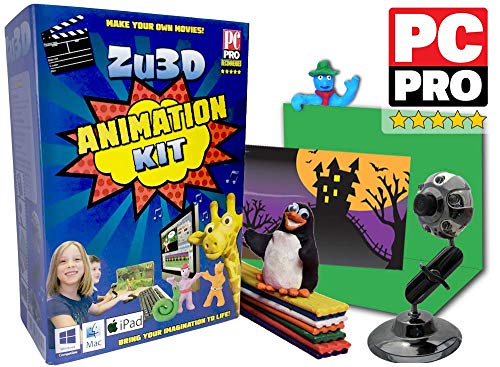
Zu3D offers a complete stop motion solution with two software licenses, an animation webcam, green screen, modelling supplies, a mini-set, and a handbook. The software is designed to be easy to use while remaining robust, featuring a library of sound effects, music, artwork, and effects. It supports use on Windows, macOS, and iPad, making it a versatile option for families and schools seeking a cross-platform experience. The kit emphasizes simplicity for beginners while enabling more complex projects over time.
HUE Animation Studio Green Complete Stop Motion Kit

The Green variant mirrors the Blue kit with a complete stop motion setup for Windows/macOS, including the HUE HD USB camera, integrated microphone, stop motion software, a 64-page animation book, a mini stage, background, printable activities, and sound effects. It is widely recommended by educators and is STEM.org authenticated. The color option provides another visual choice for studios, classrooms, or home learning spaces seeking a cohesive kit for creative projects.
HUE Animation Studio Red Complete Stop Motion Kit

The Red version delivers the same comprehensive kit as the other HUE options, including the HD camera, software, 64-page book, mini stage, and assorted activities. It maintains the same high educational value, with recognition from teachers and STEM-focused organizations. The uniformity across color variants helps schools and families maintain a consistent kit lineup while giving kids a choice in appearance for their creative workspace.
Canal Toys Studio Creator 360 Video Maker Kit

The Canal Toys Studio Creator 360 Kit brings motion tracking into kid-friendly filmmaking. It features a 360° motion-tracking camera setup with a motion-tracking module, a multi-colored light ring, a green screen, and a compatible app for iOS and Android. Its practical focus is to simplify dynamic shooting, enabling kids to capture fluid, action-packed sequences. This kit suits younger creators looking to experiment with movement and lighting in a safe, guided environment.
Buying Guide: Key Purchase Considerations
- Age and skill level: Start with kits labeled for beginners if younger than 8, and consider cross-platform software for growing skills.
- Ease of use: Look for kits with intuitive software, clear tutorials, and physical components like staged backdrops or stands.
- Camera quality and flexibility: A camera with good resolution, macro capabilities, and stable mounting reduces frustration for kids.
- Educational value: Kits endorsed by teachers or STEM organizations can provide structured learning paths and activities.
- Expandability: Some kits offer add-ons or licenses that grow with the child’s abilities (e.g., more advanced software or additional scenes).
- Durability and safety: Kid-friendly materials, non-toxic props, and sturdy stands help ensure safe, long-term use.
- Cross-platform compatibility: Software that works on Windows, macOS, and iOS/Android broadens accessibility for families with different devices.
- Storage and portability: Carry cases and compact stages support home use and classroom transport.
- Educational balance: Choose kits that balance creative play with learning objectives like storytelling, sequencing, and collaboration.
Overall, the best stop motion camera kit for kids blends ease of use, robust instructional content, and room to grow. The five highlighted options cover a spectrum from teacher-endorsed complete kits to motion-tracking styles, ensuring multiple learning styles and budgets are addressed.