Choosing a smart board for preschool settings means focusing on age-appropriate interactivity, durability, and ease of use for both teachers and young learners. The following selections cover compact classroom boards, kid-friendly collaboration tools, and engaging content possibilities that support early literacy, numeracy, and group activities. Each option offers touch capabilities, connectivity, and classroom-friendly features that can help turn lessons into hands-on experiences for preschool students.
| Product | Brand | Highlights |
|---|---|---|
| RAIZEA Smart Board 55 inch | RAIZEA | Android-based, 20 touch points, versatile for home, office, classroom |
| JYXCN 49″ Digital Interactive Smart Board | JYXCN | Android OS, 10+ user editing, wireless sharing |
| NEWORK 75 Inch 4K Smart Board | NEWORK | Google EDLA-Certified, Android 14, large immersive display |
| COOLHOOD 65″ Smart Board | COOLHOOD | 4K, multi-touch, cross-device sharing |
| Chuckle & Roar Alphabet Matching Game | Chuckle & Roar | Durable tiles, group play, 52 tiles |
RAIZEA 55 Inch Interactive Smart Board

RAIZEA’s 55-inch smart whiteboard combines Android 11 with a Cortex-A55 processor and 4 GB RAM to support smooth writing, multi-user collaboration, and easy sharing. The board supports up to 20 touch points for simultaneous interaction, enabling small groups to write, annotate, and brainstorm in real time. It integrates wireless and wired connectivity, including common ports for easy device pairing. The device is suited to preschool settings where teachers can guide drawing activities, phonics games, and collaborative counting exercises on a shared, large screen.
JYXCN 49″ Digital Interactive Smart Board
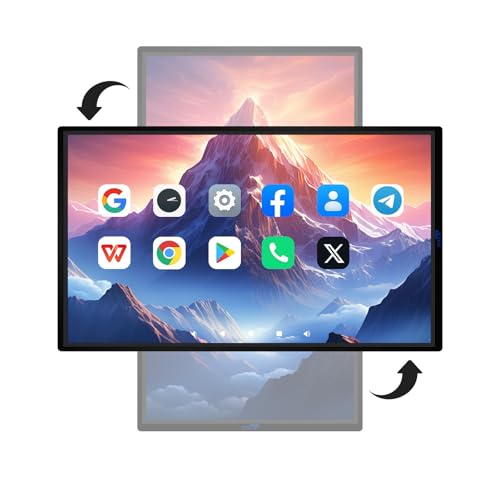
JYXCN’s 49-inch interactive board runs on Android with an 8+64GB configuration for responsive performance. It supports 5G Wi-Fi, projections, and wireless content sharing with up to four devices simultaneously. The touchscreen is designed for quick, precise input and supports both classroom presentations and hands-on activities. This size is well suited for small group centers in preschool classrooms, enabling engaging storytelling, drawing, and early literacy activities without overwhelming space.
NEWORK 75 Inch 4K Smart Board

NEWORK offers a Google EDLA-certified 75-inch 4K smart board with Android 14, 8 GB RAM, and 64 GB ROM. The expansive display supports immersive viewing with a wide color gamut and strong viewing angles, making it suitable for larger preschool classrooms or early education labs. The system emphasizes multitasking, content access through Google Play, and compatibility with collaborative apps. While the board is sizable, its broad display helps teachers run whole-class interactive lessons and group activities more effectively.
COOLHOOD 65″ Smart Board

COOLHOOD’s 65-inch smart whiteboard features 4K resolution, 20-point multi-touch, and a robust app ecosystem. The board supports wireless screen sharing across Mac, Windows, iOS, and Android devices, enabling teacher demonstrations and student participation from multiple devices. Possessing annotation tools, timers, and voting features, it can support collaborative draws, early math activities, and shared storytelling sessions in preschool environments. Stand options are available separately, aiding flexible classroom setup.
Chuckle & Roar Alphabet Matching Game

Chuckle & Roar offers a durable, kid-friendly alphabet matching game with 52 card tiles (26 pairs). This preschool-friendly activity supports letter recognition, memory, and turn-taking. It can be used on a smart board surface for interactive play or as a traditional tabletop activity. The durable cardboard tiles are designed for classroom use, making it a practical addition to early literacy centers and small-group rotations.
Logical Road Builder Games

Logical Road Builder Games offer a Montessori-inspired puzzle experience with over 200 challenges and two cars. While not a traditional board, this game fosters logical thinking, problem-solving, spatial reasoning, and color recognition—critical early skills. It suits preschool learning centers and parent-child activities, encouraging hands-on exploration that can be integrated into screen-free blocks or paired with interactive whiteboard demonstrations for a blended approach.
Buying Guide: Key Considerations For Selecting A Preschool Smart Board
- Size And Space: Choose a display that fits your classroom layout. Smaller boards (around 49–65 inches) work well for individual or small-group activities, while larger boards (75 inches) suit whole-class demonstrations.
- Touch Technology: Look for multi-touch support (at least 10–20 points) to enable multiple children to interact simultaneously. Ensure responsive input with minimal latency.
- Operating System And Apps: Android or Google-certified ecosystems provide access to education apps. Consider devices with easy updates and a friendly user interface for teachers and young learners.
- Durability And Safety: Preschool environments require sturdy construction and child-friendly materials. Verify protective casings, anti-glare displays, and simple cleaning procedures.
- Connectivity: Wireless screen sharing, USB, HDMI, and wired options support diverse devices. Compatibility with Chromebooks, tablets, and interactive content is helpful.
- Content And Tools: Built-in annotation, timers, voting, and collaborative features enhance group activities. Look for kid-friendly apps and preloaded educational content.
- Installation: Some models include wall mounting while others require stands or carts. Plan for safe placement and accessibility for preschool students.
- Budget And Longevity: Balance upfront cost with durability, warranty terms, and software updates. A longer support horizon adds value for a growing classroom.
- Maintenance: Consider cleaning routines, replaceable accessories, and service availability in your region to minimize downtime.
- Player Experience: Aim for intuitive interfaces and minimal setup complexity so teachers can focus on engaging lessons rather than troubleshooting.