Parents seeking engaging, age-appropriate tech for toddlers can choose from tablets that mix learning apps, parental controls, and kid-friendly design. This guide highlights five educational tablets that balance cognition, fine motor skills, and imaginative play for ages 1–7. Each option emphasizes language development, early math, problem-solving, and safe content so caregivers can monitor screen time and learning progress.
Summary Table of Chosen Products
| Product | Brand | Key Benefit |
|---|---|---|
| Peacurh Trilingual Learning Toy Tablet | Peacurh | Trilingual reading with interactive modes for early language acquisition |
| Amazon Fire 7 Kids Tablet (Newest) | Amazon | Ad-free, robust Kids+ library, strong parental controls |
| LeapFrog LeapTop Touch | LeapFrog | 2-in-1 laptop/tablet with early literacy and role-play |
| LeapFrog LeapPad Academy | LeapFrog | Kid-friendly Android with curated learning apps and LeapSearch |
| Trayoo 7-Inch Tablet (Blue) | Trayoo | Parental controls, offline content, and Google Play access |
Peacurh Trilingual Learning Toy Tablet

The Peacurh toddler tablet combines multiple learning themes—Alphabet, Shapes, Colors, Numbers, Animals, and more—within a compact, child-safe device. It operates in three languages (English, Spanish, French), supporting vocabulary development, listening, and pronunciation. Four play modes include Learning, Quiz, Music, and Pretend Play, helping toddlers build cognitive skills while enjoying interactive sound effects and music. The device emphasizes fine motor skills through icon-based interaction and a kid-friendly interface suitable for ages 12–18 months up to 3 years.
Key features include: 39 icons with spoken reads and sounds, a language-switch option, and modes that simulate a real tablet experience (including a pretend camera and messaging). This makes it a suitable first-step device for two- to three-year-olds looking to explore basic concepts in a structured yet playful way.
Designed for parents seeking a budget-friendly, educational entry point, this tablet prioritizes cognitive engagement without overwhelming screen time. It is compact and easy to transport, ideal for travel, therapy sessions, or quiet at-home learning moments.
Amazon Fire 7 Kids Tablet (Newest Model)
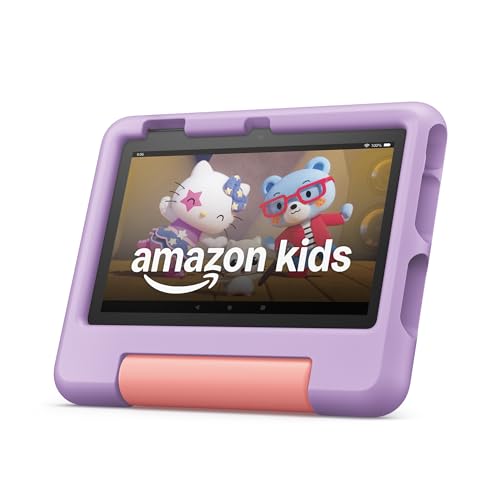
The Fire 7 Kids tablet is designed for ages 3–7 and includes a 1-year Amazon Kids+ subscription, plus a kid-proof case and parental controls. It offers a longer-term content library with thousands of ad-free books, videos, games, and STEM activities from trusted brands such as Disney and PBS Kids. The model emphasizes a worry-free learning environment that grows with a child, including curated learning paths and easy setup for caregivers. A 2-year guarantee helps address minor mishaps common with young users.
Benefits for caregivers include structured content, a safety-focused browser, and a straightforward dashboard to manage screen time and goals. After the included year, the Kids+ subscription can be renewed, enabling continued access to age-appropriate material that reinforces literacy, math, science, and creativity.
LeapFrog LeapTop Touch, Green

The LeapTop Touch blends a learning laptop with a tablet, featuring a keyboard for A–Z letters and 1–10 numbers that flip into tablet mode for imaginative play. This 2-in-1 device supports role-playing activities like emailing Scout, which helps teach early literacy, sequencing, and basic computer skills. It’s designed for preschoolers who enjoy pretend play and may benefit from a tactile interface to reinforce phonics and spelling basics. The device can be customized to a child’s name, fostering personal engagement with learning tasks.
Key advantages include a durable form factor, turn-and-learn functionality, and content designed to bridge screen-time with real-world skills. It’s suitable for children who enjoy hands-on exploration and pretend play narrative-building, providing a gentle transition to more complex digital tasks.
LeapFrog LeapPad Academy

The LeapPad Academy offers a kid-friendly Android-based tablet with 20 educational apps and creativity tools, curated by LeapFrog learning experts. It features LeapSearch, a child-safe browser, and provides a free trial of LeapFrog Academy to guide progressive learning journeys. The tablet emphasizes early reading, math, science, and problem-solving skills through age-appropriate content and interactive exploration. It is designed to accommodate repeated practice and exploration to support memory retention and cognitive development.
Designed for parents who want a ready-to-use ecosystem, this tablet bundles offline and online content with parental controls and a guided learning path. The LeapPad Academy is well-suited for preschoolers and early elementary children who benefit from structured, growth-oriented activities in a safe digital space.
TOPELOTEK Kids Tablet 7Inch

The TOPELOTEK 7-inch kids tablet targets children aged 3–12, offering a dual system with 32GB storage expandable to 128GB and 2GB RAM for smooth multitasking, offline educational content, and a robust parental control suite. It supports offline learning materials like Montessori and brain-training apps, with a secure environment designed for safe exploration. The device is built to be durable and budget-conscious, balancing learning apps with entertainment to support a broad skill set including reading, math, and creative activities.
Key strengths include the expandable storage, kid-safe environment, and a balanced mix of educational and entertainment apps. The parental controls enable screen-time management and age-appropriate content selection, making it suitable for families seeking a long-term learning device that adapts to a growing child’s interests and competencies.
Trayoo Kids Tablet 7 Inch (Blue) – YouTube & More

The Trayoo 7-inch tablet for kids offers built-in parental controls, a durable case, and a solid Android experience with Google Play access. It features a quad-core processor, 2GB RAM, 32GB storage expandable via microSD, and a long-lasting battery. The device comes preloaded with YuBaBe, delivering offline access to Montessori, brain games, drawing, and educational videos, while also enabling access to popular streaming apps when online. This model emphasizes a steady mix of educational content and entertainment with a family-friendly interface.
Its parental control options help set daily limits, filter content, and tailor educational goals. The offline resources make it a practical travel companion, ensuring learning continues even without internet access. This tablet suits families wanting flexibility between offline learning and streaming content when online.
Buying Guide: Key Purchase Considerations
When choosing an educational tablet for a toddler or young child, consider the following factors to match learning goals and family routines:
- Age range and content suitability: Check whether the device targets your child’s current age and supports progressive learning paths from basics to more challenging tasks.
- Parental controls and screen time management: Look for easy-to-use controls that allow you to set time limits, approve apps, and filter content to maintain a safe digital environment.
- Content library and offline access: A robust library with age-appropriate apps, games, and videos matters. Offline access is valuable for travel or areas with limited connectivity.
- Durability and design: A sturdy case, spill resistance, and a comfortable grip help reduce damage and encourage independent use by toddlers.
- Storage and expandability: Consider devices with expandable storage or a balance between built-in apps and additional downloadable content.
- Language and cognitive development: For multilingual households, select devices offering language switches or bilingual content to support early literacy and communication.
- Warranty and support: A reliable warranty or return policy is beneficial for devices used by young children who may encounter accidental damage.
Different families prioritize different features. Some may value pure educational apps and a strong learning path (LeapPad Academy, LeapTop Touch), while others may want broad content libraries and a kid-friendly interface with streaming options (Amazon Fire Kids). The best choice often balances educational value, safety controls, durability, and convenience for travel or daily use.