Discover engaging, screen-free ways to build foundational coding skills for children ages 4 and up. The following selection focuses on hands-on learning with robots, color-sensing toys, and story-driven programming challenges that foster problem solving, logical thinking, and creativity. Each option below is designed to grow with a child’s abilities—from simple button-based commands to more complex sequences—without relying on tablets or smartphones in many cases. The list prioritizes educational value, durability, safety, and clear learning progressions across multiple age ranges.
Summary of chosen products
| Product | Brand | Key Benefit |
|---|---|---|
| Botley The Coding Robot 2.0 Activity Set | Learning Resources | Expands early coding with screen-free play and versatile coding styles |
| My Robotic Pet: Coding Chameleon | Thames & Kosmos | Color-sensing, gesture-driven coding without screens |
| Switcheroo Coding Crew | Learning Resources | Three-in-one vehicle robot with puzzle map for hands-on problem solving |
| mBot Robot Kit | Makeblock | Scratch-compatible robotics with multiple projects and remote control |
| Code & Go Robot Mouse | Learning Resources | Screen-free maze coding with a friendly robotic mouse |
Learning Resources Botley The Coding Robot 2.0 Activity Set

Botley 2.0 builds on a proven screen-free approach that introduces young learners to sequencing, logic, and loop concepts. The out-of-the-box package includes a remote programmer and 16 interactive activities that transform Botley into a train, police car, and more. This makes it suitable for light play and structured lessons alike, with expanded coding styles, including music and movement, to keep kids engaged as they master new ideas. The set is designed for ages 5 and up, with easy-to-understand prompts that encourage independent exploration as well as guided play.
What to know: Botley 2.0 relies on battery-powered operation and a simple remote control to issue commands. The screen-free design encourages hands-on problem solving and supports early STEM development. For families seeking scalable challenges, Botley’s evolving activities introduce more complex logic while maintaining a kid-friendly, approachable interface.
Thames & Kosmos My Robotic Pet: Coding Chameleon

This color-sensing coding robot offers a tactile, screen-free entry into programming with a reptile companion that responds to gestures and color cues. The model, approximately 15 inches long, features articulated joints to simulate lifelike movement and a color sensor that interacts with action cards. No software or apps are required, making it ideal for classroom activities or family play sessions. With multiple play modes and a focus on physical interaction, it provides a tangible way to explore sequence, cause and effect, and basic robotics concepts.
Programming is achieved through physical cards and on-device controls, allowing kids to experiment with color-based rules and sensor-driven responses. The gadget’s design emphasizes open-ended exploration: learners can devise personal routines and tweaks to observe how the robot behaves in different scenarios. It’s well-suited for ages 8 and up, or younger beginners with guided activities.
Learning Resources Switcheroo Coding Crew

Switcheroo Coding Crew combines a three-in-one rescue robot with a 9-piece puzzle town map to spark problem solving and collaboration. Children can transform the robot into a police car, fire truck, or construction vehicle to complete coding missions across different locations. The construction promotes sequencing, conditional actions, and planning ahead as kids adjust the robot’s movements to navigate mazes and complete tasks. This kit targets ages 4+ and emphasizes hands-on logic development and social play as peers collaboratively tackle challenges.
The design prioritizes clear cause-and-effect demonstrations, with straightforward button-based programming that scales to more complex tasks as children gain confidence. Across solo play or cooperative sessions, the Switcheroo system keeps engagement high through thematic storytelling and varied play scenarios, making it a versatile option for early STEM learning environments.
Makeblock mBot Robot Kit

The mBot kit offers a bridge to Scratch-based coding and Arduino-friendly projects, with four included learning projects designed to introduce line following, obstacle avoidance, remote control, and more. The kit emphasizes hands-on building and problem solving, guiding learners through clear explanations and step-by-step visuals. USB or Bluetooth connectivity supports easy programming and testing, while the modular design enables expansion with additional modules and sensors to support ongoing exploration as skills grow.
With a setup time measured in minutes, the mBot helps kids quickly transition from assembly to experimentation. The combination of a friendly robot form, intuitive tutorials, and diverse project ideas makes it a robust option for classrooms and home learning alike. It’s suitable for ages 8–12, and even younger beginners can benefit from guided activities that gradually introduce more advanced concepts.
Learning Resources Code & Go Robot Mouse
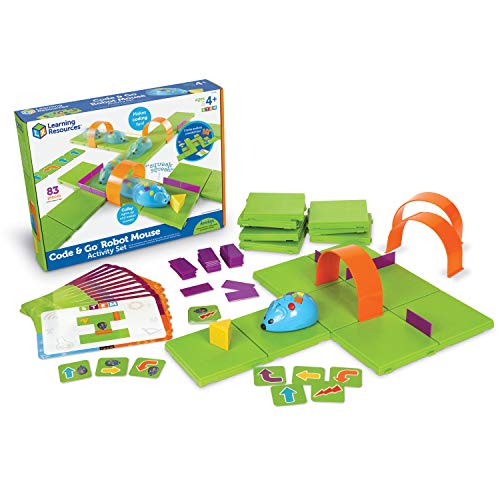
The Code & Go Mouse kit introduces kids to maze-based coding with a friendly robotic mouse that follows sequences to reach goals. This screen-free option emphasizes planning, debugging, and progressive challenges as children navigate increasingly complex mazes. It’s designed for ages 4–8 and provides a strong foundation for algorithmic thinking, logical sequencing, and spatial reasoning. The included cards, mazes, and accessories create a structured yet playful learning path that can be used for short sessions or extended activities.
Essential considerations for buyers include ensuring compatible batteries are available, evaluating whether a device aligns with your child’s motor skills, and assessing whether a mix of immediate play and scalable challenges matches your tutoring or homeschooling approach.
Buying Guide: Key Purchase Considerations And Comparisons
- Age appropriateness: Look for products clearly labeled for the child’s age range. Early options (4–6) emphasize simple sequences and directional play, while older kits (8+) introduce more complex logic and expanded project ideas.
- Screen-free focus: If screen-free learning is a priority, confirm that the product can operate without tablets or apps and still provide engaging, meaningful coding experiences.
- Learning progression: Favor sets that offer a staged learning path, with increasing complexity in tasks, sensors, and commands to grow with the child.
- Hands-on vs. guided play: Some kits are highly structured with step-by-step activities, while others encourage open-ended exploration. Consider your child’s preference for learning style.
- Durability and safety: Check build quality, age-appropriate small parts considerations, and the availability of replacement components for longevity.
- Compatibility and expansion: If you plan to expand later, choose kits that support additional modules, sensors, or compatible platforms (such as Scratch or Arduino-based workflows).
- Parental involvement: Some products include teacher or parent guides, which can enhance learning sessions, especially for younger children or homeschool settings.
- Value of play variety: A mix of robot types (vehicles, animals, and manipulators) helps sustain interest and exposes kids to different coding concepts like sequencing, loops, and conditionals.
Across these options, screen-free experiences tend to emphasize tangible cause-and-effect and collaborative play, which can lead to stronger foundational skills in logic and problem solving. For caregivers seeking breadth, combining a single multi-project kit with a couple of specialized, topic-focused toys can create a balanced learning environment. When evaluating the best fit, consider your child’s interests (puzzles, animals, vehicles) and the preferred pace of challenge to keep motivation high.