Arcade-style joysticks offer a tactile, low-latency control scheme that appeals to fighting game fans, retro enthusiasts, and players seeking precise input for PC gaming. This guide highlights five popular arcade sticks with strong PC compatibility, multi-platform support, and features that suit both casual and competitive play. Each section covers key specs, standout features, and how the controller might fit different setups—from desktop PCs to Steam Deck and console ecosystems.
Product Overview
| Product | Brand | Key Benefit |
|---|---|---|
| MAYFLASH F300 Arcade Fight Stick | MAYFLASH Store | Broad platform compatibility; Sanwa-style customization; PC XINPUT/DINPUT |
| 8Bitdo Arcade Stick for Switch & Windows | 8Bitdo Store | Wireless Bluetooth, 2.4G, and wired; dynamic button layout |
| Sehawei G16 Haute42 Keyboard Arcade Stick | Sehawei Store | Hot-swap keys and RGB with multi-system support |
| HORI Fighting Stick Mini | HORI Store | Official Sony licensing; compact and portable |
| SPEEDLINK Competition Pro USB Joystick | SPEEDLINK | Retro design; sturdy digital USB input for PC and Android |
MAYFLASH F300 Arcade Fight Stick Joystick Overview
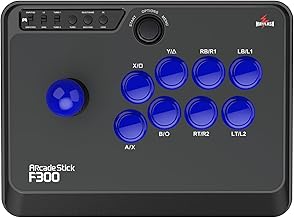
The MAYFLASH F300 is a versatile arcade stick designed for broad cross-platform use, including Nintendo Switch, PS4/PS3, Xbox Series S/X, Xbox One, Xbox 360, and PC—including macOS. Its compatibility with Sanwa Denshi-style buttons and joystick makes it attractive for users who want precise, customizable controls. On PC, it supports both XINPUT and DINPUT, enabling straightforward compatibility with most fighting and mainstream titles. This stick suits players who want a modular setup with solid PC performance and easy integration into a multi-console collection.
Design-wise, the F300 emphasizes versatility over a single ecosystem. It’s a strong choice for a living-room PC gaming station or a multi-console arcade rig. If you plan to customize, ensure you’re comfortable with swapping buttons and joystick components. The options for enhancing durability and feel align well with someone who values a tailored, arcade-like experience on PC and beyond.
8Bitdo Arcade Stick for Switch & Windows

The 8Bitdo Arcade Stick is designed for Switch and Windows, with wireless Bluetooth, a 2.4G receiver, and wired connection options. This versatility appeals to users who want a clean, cable-light setup or the reliability of a direct USB connection. The product also offers advanced software integration for customizing button mapping and macros, enabling players to tailor layouts to their favorite titles. Its dynamic button layout adapts to different modes, providing both a practical and visually engaging experience for multi-platform play.
For PC gaming, the 8Bitdo stick stands out due to its software ecosystem, which allows more granular control of inputs and macros. This is especially helpful for players who require precise control maps, such as fighting game specialists or those who enjoy emulation or rhythm titles. The trade-off is that some users may want even deeper hardware customization, which might be more readily achieved with other, swap-friendly models. Overall, it’s a compelling option for a compact, flexible arcade setup on Switch and PC.
Sehawei Haute42 Arcade Keyboard Controller

The Sehawei Haute42 blends arcade buttons with a full keyboard-style layout, offering 16 keys and customizable RGB lighting. It supports multiple platforms including Windows, PS3/PS4, Switch, and Steam Deck, plus Linux and macOS with keyboard-mode compatibility. The kit emphasizes hot-swap capability, which makes it practical for users who want to swap switches or keys without soldering. Its SOCD support and DIY options appeal to advanced users who seek precise input handling and personalized aesthetics. The setup notes indicate careful configuration for PS4/PS5 connections, which can vary by system and firmware, so users should reference the official setup guides for best results.
As a PC-friendly arcade keyboard option, Haute42 stands out for keyboard-like ergonomics and a broader range of input methods. It’s suitable for players who want a hybrid device that can function as a compact arcade console and as a PC keyboard substitute for select games. The major considerations include compatibility depth across devices and the complexity of setup for non-Windows platforms. For enthusiasts seeking a design-forward, customizable input device, Haute42 provides a distinct, feature-rich option.
HORI Fighting Stick Mini For PS5, PS4, And PC

The HORI Fighting Stick Mini is officially licensed by Sony and targets compact form-factor fighting game play on PS5, PS4, and PC. With an 8-button layout and an 8-foot cable, this stick emphasizes portability without sacrificing essential arcade combat inputs. The compact size makes it ideal for smaller desks or couch setups where space is at a premium, while still delivering a traditional arcade grip for fighters who prefer a dedicated stick over a pad. This model suits players who want a reliable, lower-profile option for console-to-PC cross-play with solid build quality.
SPEEDLINK Competition Pro USB Joystick

The SPEEDLINK Competition Pro USB joystick delivers a retro-arcade aesthetic with a modern USB interface, suitable for PC and Android devices. Its nostalgic design mirrors classic arcade cabinets, making it appealing to players who enjoy retro titles alongside modern fighters. The USB digital input is reliable for precise button presses, while the overall build prioritizes durability and straightforward compatibility. This stick serves as a practical entry point for gamers who want a straightforward, plug-and-play experience on PC with a nod to arcade heritage.
Buying Guide: Key Purchase Considerations
- Platform compatibility: Confirm whether the stick supports your primary PC setup (Windows, macOS, Linux) and any consoles you routinely use. Multi-platform models simplify gear management.
- Input method and customization: Decide if you prefer button-mapping flexibility, macro support, or hot-swappable components. For enthusiasts, hardware modability (buttons and joystick replacements) can extend device life and feel.
- Connection options: Prioritize USB for reliability, but consider wireless or hybrid configurations if your setup benefits from cable-free operation or a cleaner desk.
- Layout and ergonomics: Small form factors suit compact desks or couch setups; larger sticks may provide more comfortable long sessions. Ensure the layout matches your fighting game preferences (8-button, 6-button, etc.).
- Latency and SOCD handling: For fighting games, low input delay and correct simultaneous input handling (SOCD) can influence performance. Look for sticks that emphasize low latency and robust SOCD support.
- Ease of setup and software: Some sticks offer extensive software customization; others are plug-and-play. Consider your willingness to tidget with settings versus immediate playability.
- Build quality and aesthetics: Examine materials, button feel, and joystick type. If you plan to upgrade, ensure the model accepts high-quality components like Sanwa or Seimitsu parts.
- Community and support: Popular models often have active communities, replacement parts, and tutorials which help with troubleshooting and upgrades.
In selecting a best-fit arcade joystick for PC, evaluate your primary use cases—competitive fighting games, emulation, or casual retro titles—as well as your ecosystem (PC-only vs. multi-platform). Each option presented here offers distinct strengths: broad compatibility and customization (MAYFLASH F300), wireless versatility (8Bitdo), keyboard-integration features (Sehawei Haute42), compact portability (HORI Fighting Stick Mini), and classic arcade fidelity with straightforward PC support (SPEEDLINK Competition Pro). Consider pairing your choice with a high-quality USB cable, a spare set of buttons, and a compatible joystick for an optimized PC arcade setup.