Aspiring pilots and flight sim enthusiasts will find a wide range of PC hardware to enhance realism and precision. This guide highlights five top products designed to improve control, accuracy, and immersion for aircraft simulation on PC. Each option emphasizes authentic cockpit feel, compatibility with popular simulators, and practical setup flexibility for desks, laps, or dedicated home simulators.
| Product | Brand | Key Benefit |
|---|---|---|
| Thrustmaster T-Flight Hotas One Collector’s Edition | Thrustmaster | Official MS Flight Simulator controls with detachable throttle |
| FlightGear Flight Simulator 2025 X on USB | PixelClassics | Ultra-realistic sim with 600+ aircraft and 20,000 airports |
| Thrustmaster T-Flight Hotas One Flight Stick | Thrustmaster | Precision HOTAS with detachable throttle |
| PXN 2113 Flight Simulator Joystick | PXN | Vibration-enabled PC joystick with 12 programmable buttons |
| Thrustmaster TFRP Flight Rudder Pedals | Thrustmaster | Realistic rudder pedals for precise yaw control |
Note: All selections emphasize PC compatibility, realism in control input, and ease of integration with common flight simulators. Each product’s features are summarized in its dedicated section for quick comparison and informed purchasing decisions.
Thrustmaster T-Flight Hotas One Collector’s Edition

The Thrustmaster T-Flight Hotas One Collector’s Edition combines a flight stick and detachable throttle to recreate a cockpit-style control setup. It is officially licensed for Microsoft Flight Simulator 2025 and is fully compatible with Xbox Series X|S and PC for plug-and-play operation. The device provides 10-bit precision across five axes, including a Z-axis rudder control, along with 14 action buttons, a rapid trigger, and a multidirectional hat switch for realistic flight deck interaction. Detachable throttle enables flexible placement on a desk or in a lap for cockpit-style ergonomics.
For PC flight sims, this setup supports precise pitch and roll, responsive throttle management, and quick-access controls during takeoffs, landings, and combat maneuvers. The modular design supports different studio or desk arrangements, easing transitions between different cockpit layouts. The included control scheme mirrors many standard airliner and civilian aircraft configurations, contributing to a believable simulation environment for training flights and leisurely flights alike.
FlightGear Flight Simulator 2025 X On USB

FlightGear Flight Simulator 2025 X on USB offers a highly detailed and ultra-realistic flight experience, featuring 20,000 real airports and more than 600 aircraft. This professional-grade simulator is distributed on USB, making it a straightforward plug-and-play option for Windows systems. It emphasizes realism over arcade-style play, with downloadable content including additional aircraft and liveries that expand the virtual fleet. The package is compatible with Windows 11, 10, and older systems, though users should verify minimum hardware requirements to ensure smooth performance on their setup.
Users can expect extensive airspace coverage, varied weather scenarios, and a broad range of aircraft from light GA planes to commercial airliners. It’s well-suited for serious hobbyists and aspiring pilots who want a wide selection of flight models and a global network of airports to explore. Potential buyers should review the included manuals and community-created add-ons to maximize the realism and maintenance of their virtual fleets.
Thrustmaster T-Flight Hotas One Flight Stick

The Thrustmaster T-Flight Hotas One Flight Stick delivers a compact, precise control solution for PC and Xbox Series X|S. It features a precision joystick with a detachable throttle and a responsive trigger, along with a hat switch and multiple programmable buttons for flexible control mapping. Its ergonomic design supports extended sessions, with customizable resistance to tune feel during long flights. The modular hardware is particularly suited to cockpit-like arrangements on desks or lap mounts, allowing users to tailor their flight posture and reach to comfort and accuracy during flight operations.
In practice, the Hotas system supports a broad spectrum of flight sims, from training-focused simulations to action-oriented aerial combat titles. Users can assign essential flight controls to accessible buttons, providing faster transitions between maneuvers and better muscle memory when practicing approaches and landings. The detachable throttle adds to the versatility, enabling different setup configurations for varied flight scenarios.
Thrustmaster TFRP Flight Rudder Pedals

The TFRP Flight Rudder Pedals by Thrustmaster provide realistic foot-operated yaw control, essential for precise turns and coordinated flight. The pedals feature a sliding rail system to optimize motion, facilitating smooth and accurate rudder input. The design emphasizes stability and consistent feedback, which is important for long flights and complex instrument approaches. The pedals are compatible with various Thrustmaster control setups and can be paired with HOTAS systems to create a more complete cockpit environment for PC flight sims.
Users should consider pedal sensitivity and travel as they pair these with a HOTAS or standalone control setup. The realistic pedal movement helps emulate crosswind landings, coordinated turn maneuvers, and nuanced rudder inputs for tail-dragger or multi-engine aircraft. For enthusiasts focusing on advanced flight training or immersive cockpit experiences, adding rudder pedals can significantly enhance control fidelity and reaction times during critical phases of flight.
PXN 2113 Flight Simulator Joystick

The PXN 2113 is a USB gaming flight stick featuring vibration feedback, 4-axis control, an 8-way hat switch, and 12 programmable buttons. It is designed for PC flight simulation and supports a broad array of titles, including Microsoft Flight Simulator and X-Plane. The ergonomic single-handle design, along with suction cup feet and a compact footprint, makes it suitable for tight desk spaces. The included software supports customization of button mappings, sensitivity, and dead zones to tailor the stick to individual aircraft profiles and pilot preferences.
While offering an accessible price point, users should be aware of driver installation and compatibility notes. It is intended for Windows PC use and may require driver updates or software configuration to achieve optimal performance with specific simulators. The device is best suited for casual to mid-level enthusiasts who want a responsive control option without committing to a larger HOTAS setup.
PXN Flight Simulator Controls 2113 (Second Listing)
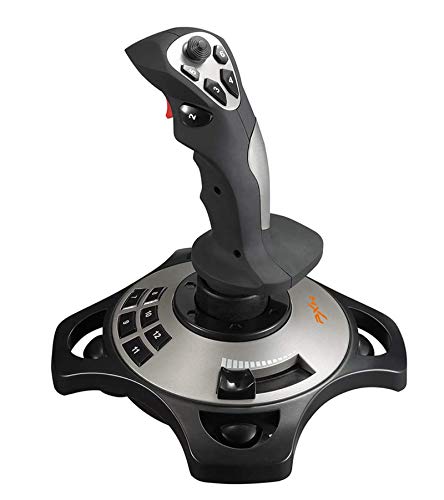
This PXN 2113 listing reiterates a similar hardware profile with vibration features, USB connectivity, and broad compatibility with PC flight sims. It emphasizes plug-and-play operation, with notes about compatibility explicitly listing supported Windows versions and flight simulators. The device remains a compact option for users seeking tactile feedback and multiple programmable inputs without the scale of a full desktop cockpit. It is particularly attractive for those who want quick setup and easy transportation between workspaces or gaming areas.
Considerations for PXN devices include verifying driver availability, ensuring the software supports your preferred simulators, and balancing the desire for vibration feedback with your system’s processing capabilities. For some users, a sturdier HOTAS setup may better replicate throttle, prop, and engine controls; for others, PXN’s form factor offers sufficient control fidelity for enjoyable, realistic flying experiences on PC.
Buying Guide: Key Purchase Considerations For Aircraft Simulator PC Gear
- Compatibility: Verify which simulators you use (Microsoft Flight Simulator, X-Plane, FlightGear) and ensure the hardware supports them. Check whether the device is compatible with PC only or includes console support as well.
- Control realism: Assess whether you prefer a full HOTAS setup with a joystick and detachable throttle, or a pedal-based rudder system for authentic yaw control. For some users, combining both enhances flight realism significantly.
- Ergonomics and setup: Consider desk space, seating, and how modular the hardware is. Detachable throttles and pedal rails can improve comfort and positioning for longer sessions.
- Programmability: Look for devices with programmable buttons and customizable sensitivity curves. This helps tailor aircraft control profiles to specific planes and pilot preferences.
- Durability and build: Prioritize sturdy construction and smooth action. Pedals and sticks with stable bases reduce wobble during tense maneuvers during landing approaches.
- Software support and updates: Some hardware relies on companion software for drivers and profiles. Ensure ongoing support and driver availability for your Windows version.
- Upgrade path: If you start with a compact HOTAS, plan for future expansion by selecting hardware that scales (e.g., add pedals or upgrade to a larger throttle quadrant).
- Price-to-performance balance: Evaluate how much fidelity you gain relative to cost. For beginners, entry-level HOTAS and mid-range pedals may offer strong value; for enthusiasts, higher-fidelity gear justifies the investment.
The selected products present a range of options from compact sticks to full cockpit-style arrangements. Users seeking a robust, ready-to-use experience may favor officially licensed controllers with precise axes and a reliable throttle, while those prioritizing a broad library of aircraft and world airports may lean toward FlightGear and PXN options for flexibility and affordability. In all cases, consider how the gear integrates with your current PC specifications and the simulators you intend to run for the best overall flight experience.